Salesforce Messaging Channel
A complete WhatsApp channel built inside a Salesforce messaging product, so service agents chat with customers on WhatsApp without leaving Salesforce.
Delivery signals
Confidential client engagement
695
automated tests
15
message types
12
capabilities shipped
2-way
messaging inside Salesforce
01 / Context
The operating environment
A software vendor selling a messaging product for Salesforce Service Cloud needed WhatsApp as a production channel. Marsos owned it end to end: architecture, code, agent UI, onboarding, tests and documentation.
02 / Business outcome
What changed for the client
The result this engagement delivered — before any of the engineering behind it.
Shipped as part of the vendor's product releases.
Agents handle 15 message types without leaving Salesforce.
Every message is traceable from send to delivery.
03 / Challenge
Complexity before transformation
Business onboarding runs through Meta's own signup flow, not a simple API key.
After 24 hours of customer silence, only Meta-approved templates can be sent.
Templates must be approved by Meta and kept in sync both ways.
Meta can't call Salesforce directly, so every message needs a secure relay.
04 / Delivery
What our technical team engineered
Guided business onboarding and number activation.
Two-way messaging in the Salesforce agent workspace.
Template builder with Meta's approval built in.
WhatsApp Flows, buttons, lists and carousels.
Delivery tracking and an audit trail that can't be edited.
05 / How it works
How a message reaches an agent
The system, one step at a time — the sequence that carries an order, a shipment or a decision from start to done.
- 01
Customer
Sends a WhatsApp message.
- 02
Meta
Forwards it as a signed event.
- 03
Relay
Verifies it and routes it to the right business.
- 04
Salesforce
Our package checks and delivers it.
- 05
Agent
Replies from the Salesforce workspace.
06 / System Architecture
Architecture revealed as a system story.
Scroll through the technical decisions to see how each platform layer connects to the next.
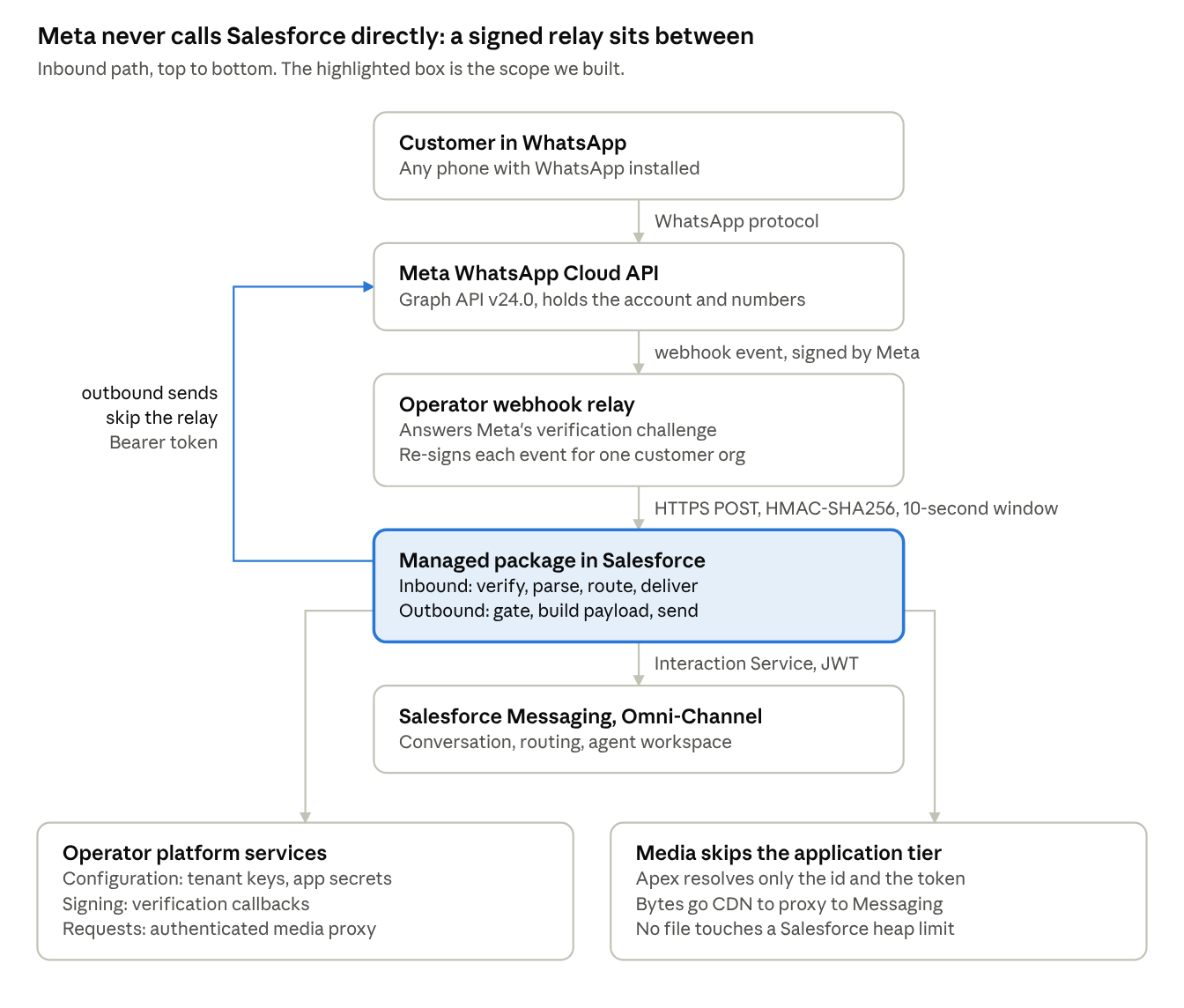 Open full-size diagram ↗
Meta never calls Salesforce directly: a signed relay sits between. The highlighted box is what Marsos built.
Active decision
Check the 24-hour window before sending, so agents see a clear reason, not an error.
Architecture decision
Check the 24-hour window before sending, so agents see a clear reason, not an error.
Architecture decision
Retry only the failures Meta marks as temporary.
Architecture decision
Stream media straight to Salesforce, never through its memory limits.
Architecture decision
Sign and time-check every inbound message.
07 / Engineering highlights
Where the hard problems were won
The proof points a technical buyer should inspect first.
Impact
Secure by design
Every inbound message is signed and checked.
Impact
Nothing gets lost
Failed media still reaches the agent as text.
Impact
Clear to agents
Meta's rules show up as plain reasons, not errors.
Impact
You keep your account
Your WhatsApp account, numbers and billing stay yours.
08 / Platform surface
The capability map
Message types
09 / Technology
The delivery stack
Salesforce Managed Package
Apex
Lightning Web Components
Salesforce Messaging
WhatsApp Cloud API
WhatsApp Flows
Confidentiality protocol
The client is named only by category, at their preference.
Build with Marsos
Bring us the difficult system.We will make it buildable.
Start with a clear technical direction, an architecture that can scale, and a delivery plan your team can trust.